✦ Pay once from $29 · no monthly fees

The to-do list that reminds you.

Your tasks on a board and a calendar, one email each morning with what’s late, and a daily report of what got done — all inside Google Sheets.

  • Pay once
  • Data in your Drive
  • Phone & PC
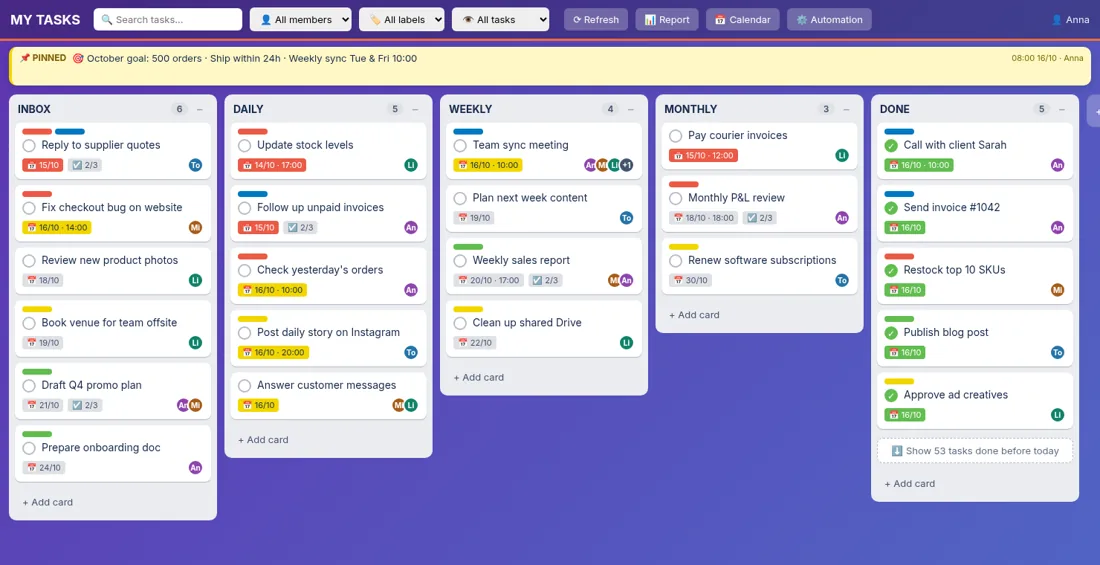
SheetHandy task board with lists for Inbox, Daily, Weekly and Monthly tasks
11boards run daily
1email, not 9
$0monthly fees

“We built SheetHandy to run our own e-commerce business — sales, ads, shipping, stock and accounting. It replaced our Trello + calendar + notes juggling.” — The SheetHandy team

Three jobs. One tool.

Every day, without you asking.

It keeps your listYour list

Every task in one place, with who does it and by when.

It reminds youReminders

One email each morning: what’s due today and what’s late.

It shows what’s doneDone report

A daily report of what got finished — and what didn’t.

Real app, not a mockup

Six tools in one Google Sheet.

Board

Tasks like sticky notes

Each task is a card. Move it from “To do” to “Done”. Open it to see the details.

  • Who does it, and by when
  • Colour labels and checklists
  • Done or Cancel in one tap
Real app · 23s
Repeat tasks

Tasks that repeat

“Weekly report every Monday.” Set it once — the task shows up on time, every time.

  • Daily, weekly or monthly
  • Set time, deadline and owner
  • Turn each one on or off
Real app · 32s
Calendar

See your busiest days

The month view counts tasks on each day. Too many on Friday? Move some to Tuesday.

  • The whole month at once
  • Task count for every day
  • Green = done, red = late
Real app · 16s
Google Meet

Video calls from a task

Pick a time, add people, press one button. The Meet link lands in the task — and in your guests’ Google Calendar.

  • Meet link saved in the task
  • Guests get a calendar invite
  • Pick guests from contacts
Real app · 29s
Morning email

One email every morning

Each person gets one short email: what’s due today and what’s late. No need to open anything to know your day.

  • You choose the time
  • One email for all boards
  • Team summary for the boss
From: SheetHandy <[email protected]> · 8:00 AM
[Reminder] 4 tasks due / overdue

Hi Anna, you have 4 tasks due today or late:

MY TEAM (3)
• Chase unpaid invoiceslate
• Check yesterday’s orders10:00
• Team sync meeting10:00
SALES (1)
• Send B2B quotestoday
Daily report

See who did what today

One screen shows what got done, what’s still open and what was missed — for each person.

  • Done, not done and late
  • Progress for every person
  • Missed tasks + last comment
Real app · 15s

A day with SheetHandy

Four steps, mostly automatic.

  1. Add a taskType “Send invoice”, pick a day and a person. Done.
  2. On the boardLike sticky notes on a wall — and on the calendar too.
  3. Morning emailAt 8 AM everyone gets their list: due today + late.
  4. See the resultTick it done. The report shows who finished what.

For you or your team

Extras that keep everyone in sync.

All your boards

Your board and each team’s board, one click apart.

Share a task

Send a task to a team and tag people. Status stays in sync.

Pinned note

Goals and rules on top of the board for everyone to see.

Who works today

Today’s and tomorrow’s shifts, right next to the tasks.

Fast on phones

Opens in about a second. A + button adds tasks quickly.

Only your people

Data stays in your Sheet. Only members you add can open it.

Why not Trello or Notion?

Several apps, paid per person, every month.

FeatureSheetHandyTrelloGoogle CalendarNotion
Task board✓✓—✓
Recurring tasks✓via rulesevents onlytemplates
Daily task count✓paid planevents onlyno count
Meet from a task✓—✓—
Morning reminder✓per cardper eventper item
Daily done report✓——DIY
Data in your Sheet✓———
Pay once✓———

Pay once, not monthly

Slide to your team size.

Plan: Team · $59
Trello + Notion1 year$1,200
Trello + Notion3 years$3,600
SheetHandyforever$59

You save $3,541 over 3 years · paid back in 18 days

Public list prices billed annually (Oct 2026): Trello Premium $10/user/month (needed for Calendar view), Notion Plus $10/user/month. Prices may change; check each vendor’s site.

Two plans. Pay once.

Reserve now, pay later.

Personal

For one person juggling a lot.

$29one-time

Trello + Notion, 1 user: $240/yr

  • Board, calendar & daily report
  • Auto-repeating tasks
  • Morning reminder email
  • Google Meet from tasks
  • Setup video guide
Best for teams

Team

The whole team, up to 15 people.

$59one-time

Trello + Notion, 5 users: $1,200/yr

  • Everything in Personal
  • Assign, tag & share tasks
  • Per-person + team reports
  • Pinned note & shift view
  • 30-min setup call

Ready in 10 minutes

  1. Get your copyYou get your own SheetHandy, linked to your Google account. Your data never leaves your Drive.
  2. Click “Allow” onceSo it can send reminder emails and Meet invites from your own Gmail and Calendar.
  3. Add tasks & teamType your lists, repeat tasks and team emails. Team plan: we help you on a 30-minute call.

Questions, answered

Need a paid Google account?

No. It works with a free Google account. Google Workspace accounts work too.

Is it a Google Sheet or an app?

Both. Your tasks are saved in your own Google Sheet, and you use them in a fast web app that opens from a link on your phone or computer.

Isn’t this just a template?

A template is a static sheet you update by hand. SheetHandy is a working app on top of your sheet: a board, repeat tasks, morning reminder emails, a daily report and Google Meet booking — already set up for you.

Can I use it instead of Trello?

Yes. You get boards, cards, labels, checklists, comments and due dates like Trello, plus a calendar view, daily reports and morning reminders — for a one-time price.

How do emails & invites work?

They are sent from your own Google account. You click “Allow” once during setup.

Can my team log in too?

Yes, with the Team plan. Add their emails and they sign in with Google — no new passwords.

What happens after I buy?

You get your own copy linked to your Google account, click “Allow” once, then add your tasks and team. Team plan buyers also get a 30-minute setup call.

Is there a monthly fee?

No. You pay once and keep using it. Extra setup help or custom features are quoted separately.
From $29 · pay onceGet early access

Reserve SheetHandy Tasklist

Checkout opens soon. We’ll email you the launch link first — no payment today.

We only use your email to send launch info. Unsubscribe any time.